

Your movie just doesn’t seem complete without a voiceover. Fortunately, you don’t have to hire a professional to record a voiceover in Apple iMovie. You can narrate a movie and add your voice anywhere you want in your video.
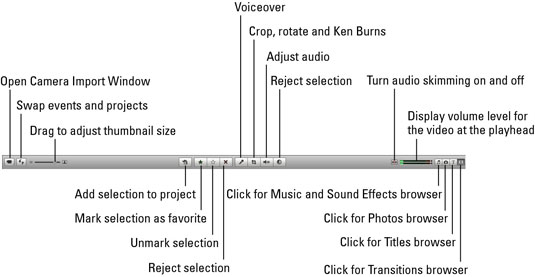

1. Click the Voiceover button and then choose your real microphone (or sound input device) from the window that appears.
The voiceover button looks like a microphone.
2. Drag the input volume slider so that it matches the loudness of your voice.
You can select a Voice Enhancement box to electronically make your voice sound swell. Remember that any sound in your video will be heard as you record your own voice unless you mute it.
3. Select the Play Project Audio while Recording box if you need to hear sound as you record your voiceover.
When you click the video frame in which you want to speak, the program prompts you with a 3-2-1 countdown.
4. Click anywhere in the project to stop recording.
You’ll see a purple soundtrack icon in the video where your voice will be heard. If you’re unhappy with your sound, click Undo Voiceover and try again.

