This gallery contains 9 photos.
WordPress supports quality efforts from bloggers around the world. It isn’t just about putting stuff out there. It is really about developing ways to tell great compelling stories. Check out some of these projects.
This gallery contains 9 photos.
WordPress supports quality efforts from bloggers around the world. It isn’t just about putting stuff out there. It is really about developing ways to tell great compelling stories. Check out some of these projects.
There are dozens of tutorials available on creating DVD’s. In this case quick is a good thing. You don’t have to be a genius. Just use the templates. You can get creative later. Continue reading
These free, self-instructional exercises address issues of grammar, usage and AP style that students may encounter in newswriting. The Newsroom 101 site creators developed over 2,000 interactive lessons for journalists, professional writers, college students, high-school students and others who are learning or reviewing journalistic language. Continue reading
Applying quality Chroma Key effects begins with selecting the color and tone of your background. Color is followed closely in importance by lighting the background and the subject separately. Buying specially formulated paint is expensive when your local paint store can often supply a quality option. Continue reading
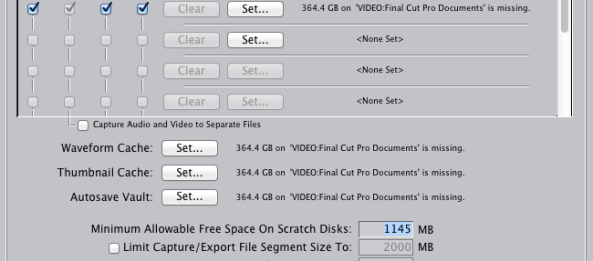
Whenever you encounter problems or have questions in Final Cut Pro it is always a good idea to search the help files first. They generally are well written and provide much of the necessary help immediately. Such is the case with setting the scratch disks either when FCP is first opened, if they are “misplaced”, or if you want to specify a destination such as an external firewire drive for your project content. Continue reading
When we talk about blogs we generally start with words, then add pictures, sound and sometimes video. Generally we forget about visualizing data. Continue reading
If you have a WordPress or any other blog site there will probably come a time when you will need to use some HTML code to make your site function more like a basic website. You don’t have master code or even be particularly code savvy. You will need to spend a little time deciding exactly what you want to do and be able to visualize the page. Continue reading
As we continue to experiment with social media it becomes increasingly necessary to decide where to place a message, learn who is talking about that message and quantify the impact of what they are saying.
Developing a good social media strategy is key to any personal or corporate media plan. Continue reading
Smaller….faster…..better…..more powerful. Our always connected mindset has spawned a whole new generation of high-tech tools. You can now shoot, edit and deliver content in many ways using a variety of tools. We may have the tools but do we know how to use them? The following tools, tech and training sites offer some interesting perspectives.
Vimeo video editing app “Cameo”
Just Creative 5 best photo apps
Best iPhone camera editing apps
Shoot video like a pro on your phone
Mobile video tips and techniques
Jack Hollingsworth on iPhoneography
iPhone video image capture (This is a quick option that works on Cronkite computers.) Image capture is in your applications folder.
Camera Awesome: Cool Camera App
Best sites to learn about iPhoneography by Make Use Of
If you have additional tools, ideas, tips or techniques please enter them in the comments section and I’ll review and post them.
OK. You’ve created a video in Final Cut Pro. You want to put it in your blog. What now?
Once again find that calm place in your mind. It isn’t that tough.

In Final Cut Pro, click in your timeline. (Make sure you don’t select a specific element.)
Go to File>Export>QuickTime movie.
Name your movie and export it to your desktop so you can find it easily.
When it finishes, double click on it to open it using QuickTime Player. Play it to make sure everything is OK.
While you are still in QuickTime Player Select File>Save for Web. Name the file and save to your Desktop. Check the box Computer H.264, 5 Mbit/s maximum data rate.
Uncheck the other boxes. Select Save.
When that is completed, find the folder created on your desktop. Right click on the video file inside the folder that says computer m4v. Right click and open it using QuickTime Player. View it and make sure everything is working.
When you are satisfied, upload the file to either YouTube or Vimeo.
Open the video, copy the URL.
In your WordPress account simply paste the URL of the video into the Post Edit screen. When previewed or published, WordPress will automatically embed the video.
For more help with WordPress check out this Ultimate Guide from Make Use Of. Provided via Creative Commons “share alike” license.